
Improvements
Countries Normalization
The system will now look at the country preference in your CRM and determine if there are values that do not match the expected values. Different CRMs have different requirements for storing the country value, including:
- Country name - the full country name, like "United States of America"
- 3-digit code - "USA"
- 2-digit code - "US"
Why does this happen?
Invalid country values can appear for many reasons, but typically these are created during database conversions or bulk imports when the CRM does not validate the entries. Sometimes the CRM does not properly validate input data or the incorrect country is selected during data entry. This can also happen during system releases when old values are not converted correctly during upgrades or changes in system functionality.
What do these look like?
Some example of invalid country values include:
- Multiple values for the same country not matching the expected value defined by the CRM - "United States" or "U.S.A" when "US" or "USA" is expected.
- 2-digit where 3-digit is expected (or vice-versa) - "US" for "USA".
- Misspellings - "United Staates" when "US" or "USA" is expected.
- Invalid data - sometimes a postal code or phone number appears in the country field and cannot be easily converted.
- Blank/missing - no value is present or was entered or loaded into the country field.
Why do I need to care about this?
In order to process the address updates, a valid country value is now a requirement due to support for additional countries. When no valid country value is provided, the process will ignore the record during the download process so it's important that your country codes are updated to meet the specifications of your CRM.
Implementation
You may see this message on your dashboard indicating there are country codes in your CRM that are not compatible with the download and address update process.

Clicking on the link will take you to a page where you can select a valid country code for those records in your CRM that contain either missing/blank values or code/names that are not supported by your CRM.
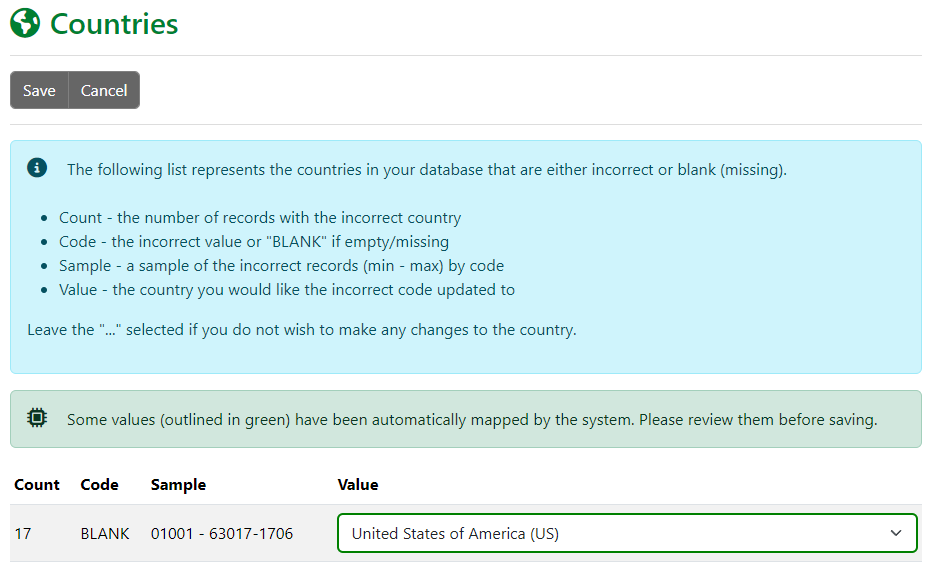
Clicking "Save" will update your database immediately with the value(s) you selected.
Fixes
Database Downloads
The last download date has been corrected to use the start of the current download and not the end. For some CRMs, the dates could have skipped some records created/updated over the change of day from 11:59 PM to 12:00 AM.